For any organisation in the Philippines that runs inspections

Your inspectors already do the work.
This is the record of it.

Inspections filed on the phone at the site — with no signal if that is what the barangay gives them — carrying their photos, their reference number and the name of the officer who approved them.

Or call +63 917 578 6060 — you will get a person, not a queue.

Built in the Philippines by XYPES Technologies. First organisations onboarding from October 2026.

InspectPH

Inspect smart. Serve better.
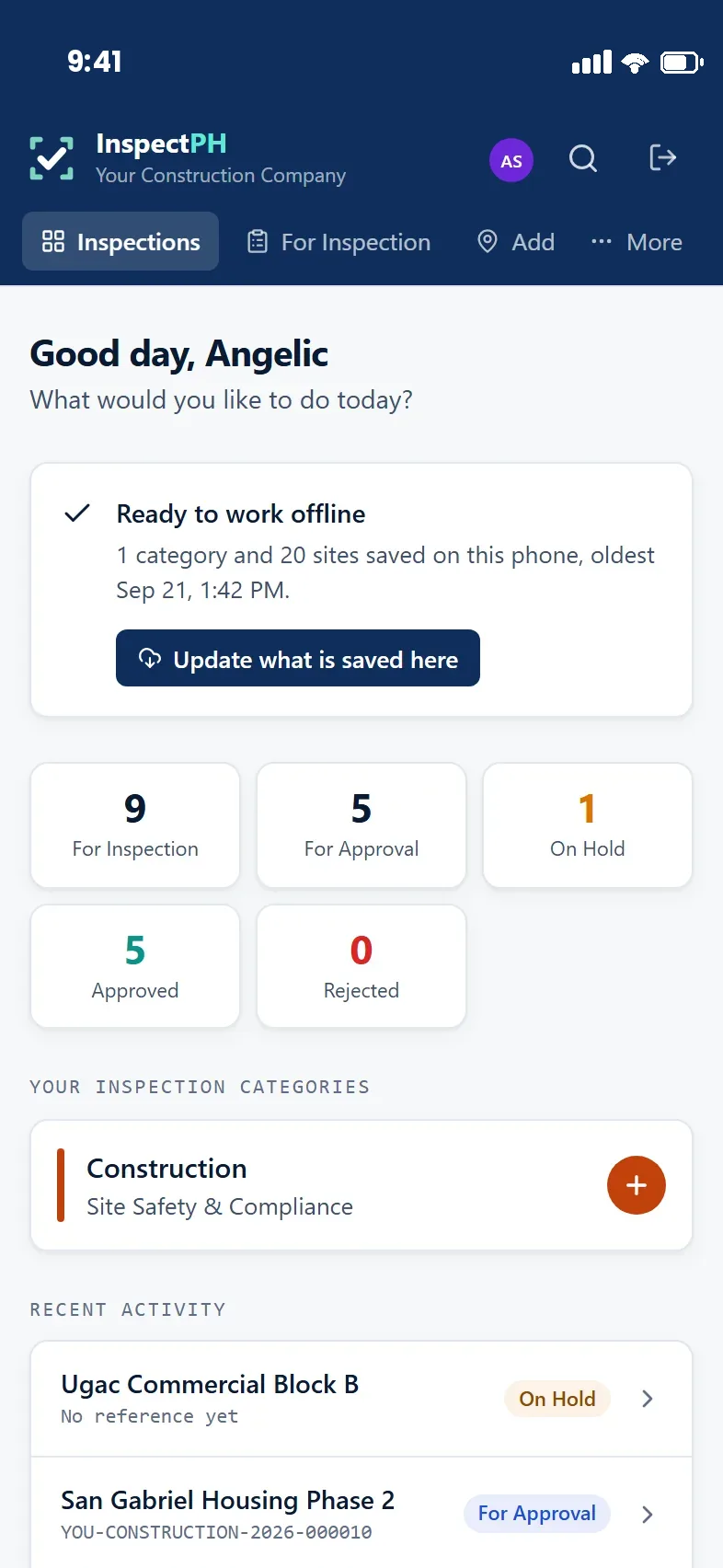
A supervisor's dashboard: sixty-four sites for inspection, fifteen waiting for approval, twelve on hold, and the categories they cover.

An actual screen from the app, at the size it is on the phone.

Works at zero signalStart and finish an inspection with no connection.
42,024 barangays loadedAddresses chosen from the official PSGC list, not typed.
Locked on submissionReference number issued, record no longer editable.
Excel and PDF in one tapNo one assembles the monthly report by hand.
The app

An inspector's whole day, on the phone in their pocket.

No tablet to buy, no laptop in the field, nothing to install from a shop. It opens like a website and saves to the home screen like an app.
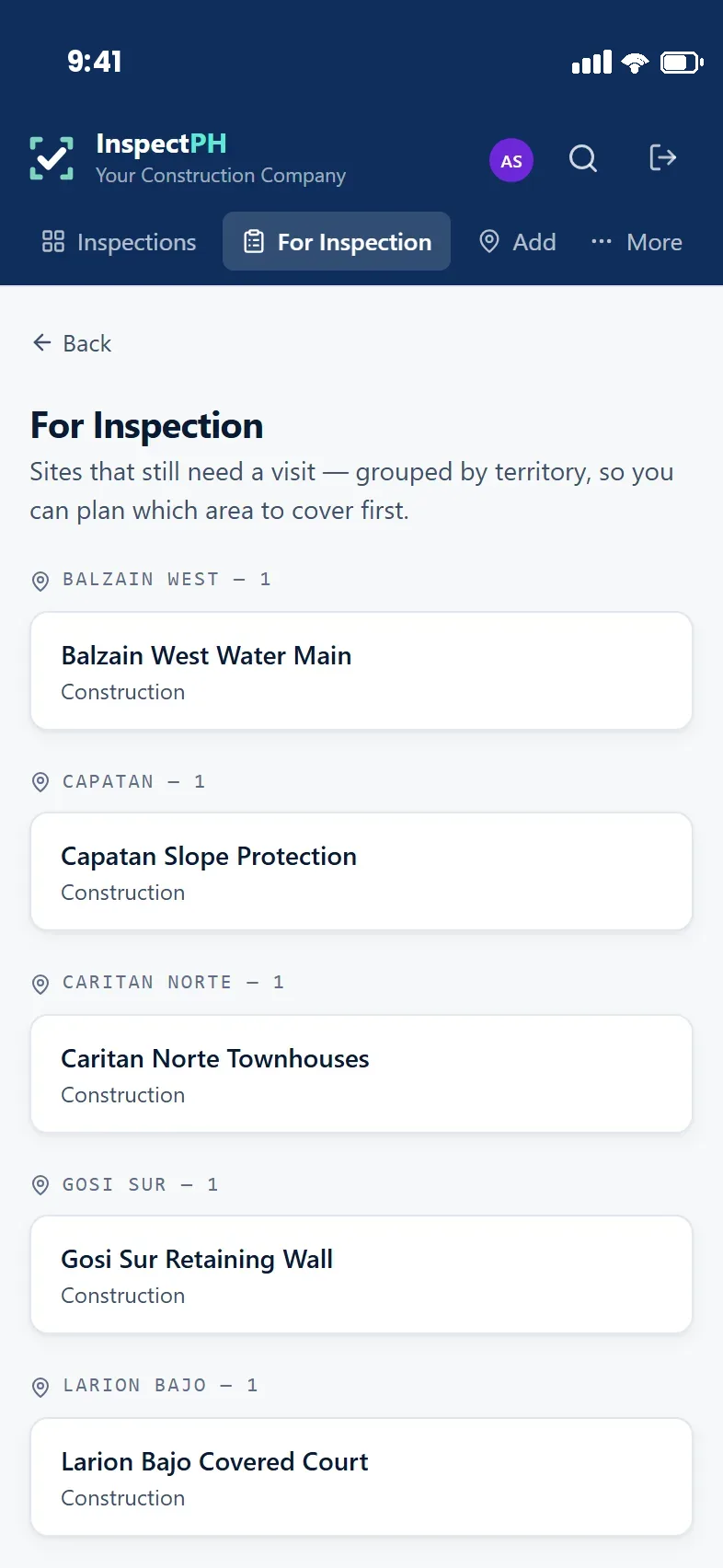
For Inspection list: construction sites still needing a visit, grouped by the territory each one sits in.
1 · Know where to goAssigned sites, grouped by barangay, so a day can be planned as a route.
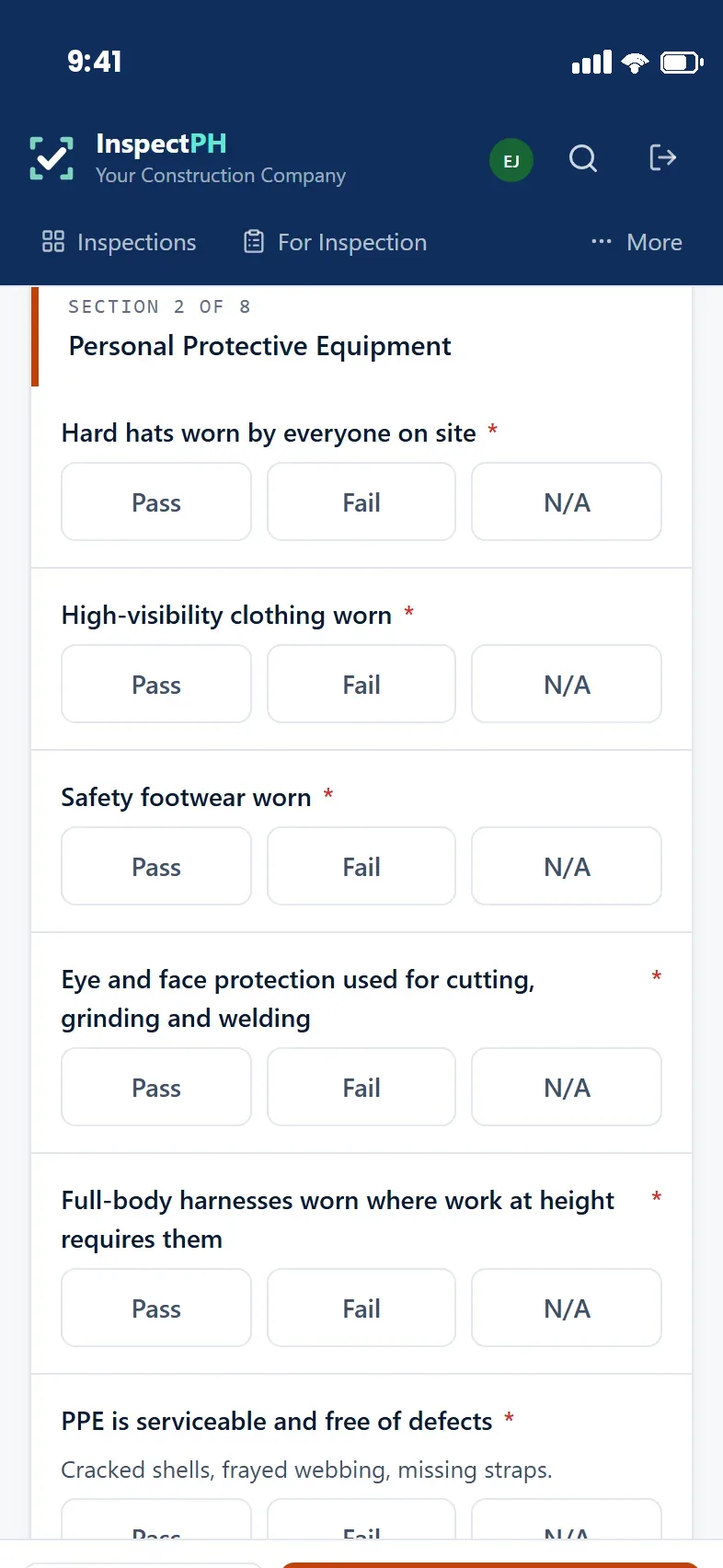
Site safety checklist with Pass, Fail and N/A buttons for each item.
2 · Fill your own formYour own questions, in your own order. Photos attach to the finding.
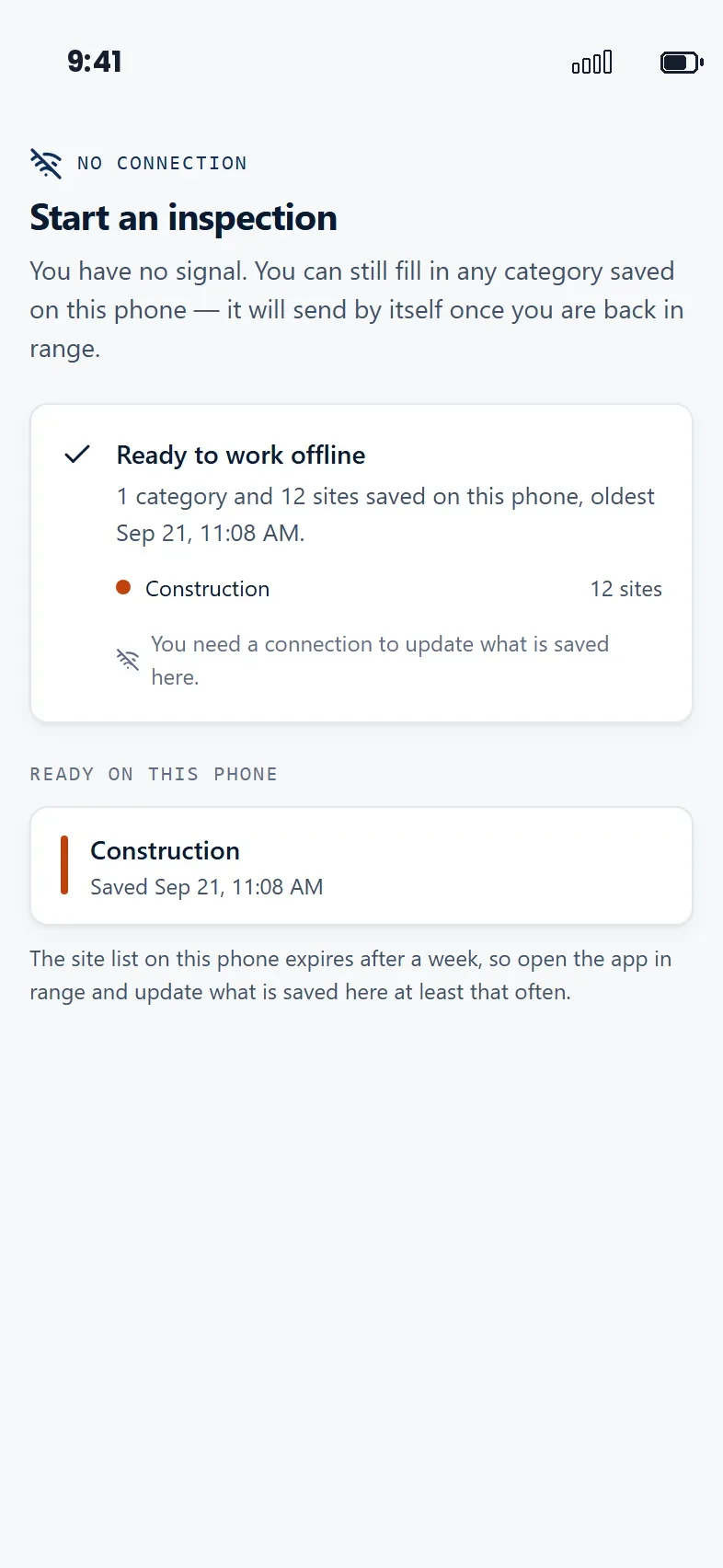
Field mode showing no connection, with the category and site list saved on the phone.
3 · Keep working with no signalSaved on the phone, sent by itself once the phone is back in range.
The part that decides it

The barangay with no coverage is the one you still have to inspect.

Most inspection software assumes a connection and fails quietly without one — the form will not open, and the inspector goes back to paper. InspectPH keeps the assigned categories, their forms and their site lists on the phone itself.

Nothing is lost waiting for a bar of signalThe inspection is written to the phone as it is filled, not held in a browser tab.
It sends itselfBack in range, queued inspections upload on their own. The inspector does not have to remember.
The time on the record is the time of the visitCaptured on the device at the site, not stamped when the phone happened to reconnect.
No connection banner above a list of categories and sites saved on the phone for offline work.
What changes

The inspection is the easy part.

The hard part is everything around it — and almost all of it is copying, matching and re-typing work that was already done once at the site.

How it usually works

Paper out, spreadsheet back.

Filled on paper at the site, re-encoded at the office — twice the work, and the second copy is the one that gets filed.
Photographs sit in the inspector's phone and are matched to a record from memory, if at all.
The supervisor's picture of the week is assembled by asking people.
Producing last year's inspection of one establishment means opening a filing cabinet.
With InspectPH

Filed once, at the site.

The inspector fills the form where the work happens — offline if there is no signal, sending by itself when there is.
Photographs attach to the finding they belong to, at the moment they are taken.
The supervisor sees what is filed, what is waiting and what was sent back — without asking.
Any past inspection of any site is one search away, evidence and approval still attached.
Time & cost

The same inspection. Everything after it, gone.

The visit itself does not get shorter — an inspector still has to walk the premises and look. What disappears is the second and third handling of the same information.

Illustration — not measured results
One inspection today, on paper Same facts recorded three times
At the site
Re-encode it
Match photos
Build the report
  • At the site — the inspection itself
  • Re-encode it at the office
  • Match the photographs to the record
  • Build the report at month end
The same inspection with InspectPH Recorded once, where it happened
At the site
Export
The rest does not happen
  • At the site — unchanged
  • Export the report — one tap
  • The rest does not happen
The inspection itself — unchanged Handling the same facts again One tap Work that no longer exists

The bars above illustrate a typical paper workflow. They are not pilot results, and we will not quote a percentage we have not measured — the point of the pilot below is to produce that number for your own office, from your own inspections.
No hardware to buy It runs on the phone the inspector already carries. Nothing to procure, nothing to replace when it is dropped.
No charge per inspector A seat allowance per department, so adding a casual inspector for a permit rush costs nothing — and nobody shares a login.
No encoder in the loop Nothing is typed twice, so nobody is paid to type it twice, and nothing is mistyped on the second pass.
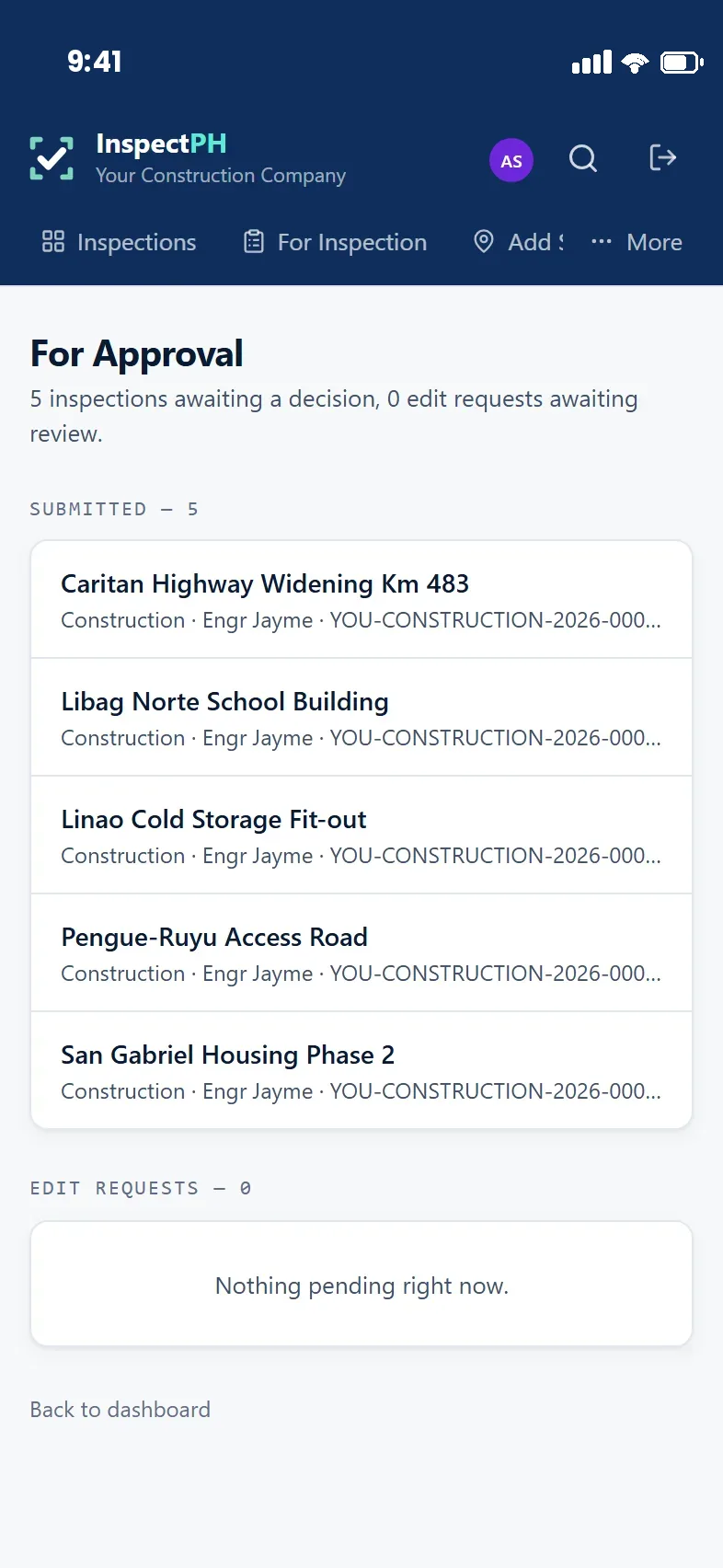
For Approval queue: five submitted inspections with the site, category, inspector and reference number on each.
Supervisor dashboard: ready to work offline, with counts for inspections due, awaiting approval, on hold, approved and rejected.
For supervisors

Open the phone. The backlog is already counted.

No one prepares a status for you. What is waiting, what is overdue, who filed it and what they found is on the first screen — updated the moment an inspector submits, not at the end of the month.
Approve, or send it back with a reasonBoth outcomes are recorded, and the inspector sees exactly what to correct.
Check a site before you are asked about itSearch an establishment and read its whole inspection history, with photographs, in front of the person asking.
Coverage by territory, not by anecdoteWhich barangays have been covered, which sites have never been visited, and where the failures cluster.
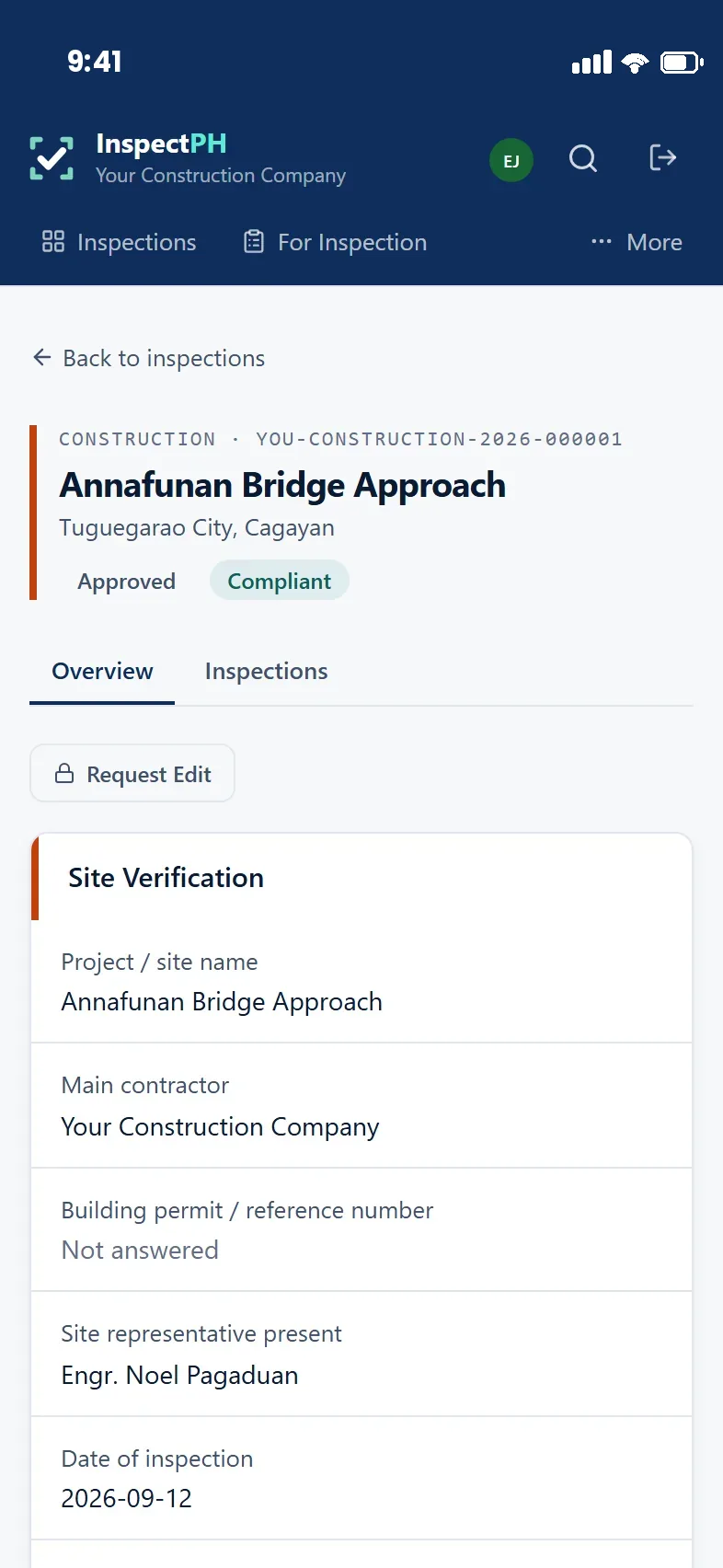
A submitted inspection record showing its reference number, the site, an Approved and Compliant status, and the answers item by item.
The record

What you can put in front of an auditor six months from now.

Every submitted inspection carries the same five things, whether it was filed this morning or last year.

The site and the categoryWhich establishment, in which barangay, under which inspection programme.
The findings, item by itemPassed, failed or not applicable — a failed item cannot be saved without a written reason.
The evidencePhotographs taken at the site, stored with the record rather than in someone's phone gallery.
The reference numberA per-organisation, per-category, per-year series, issued on submission so an abandoned draft never leaves a gap.
The decisionApproved or returned for correction, stamped with who decided and when. Reopening it needs a logged request.
Reports

The monthly report is a download, not a project.

Compliance, backlog, coverage, inspector productivity and category performance — as Excel to work with, or PDF to attach to a memo.
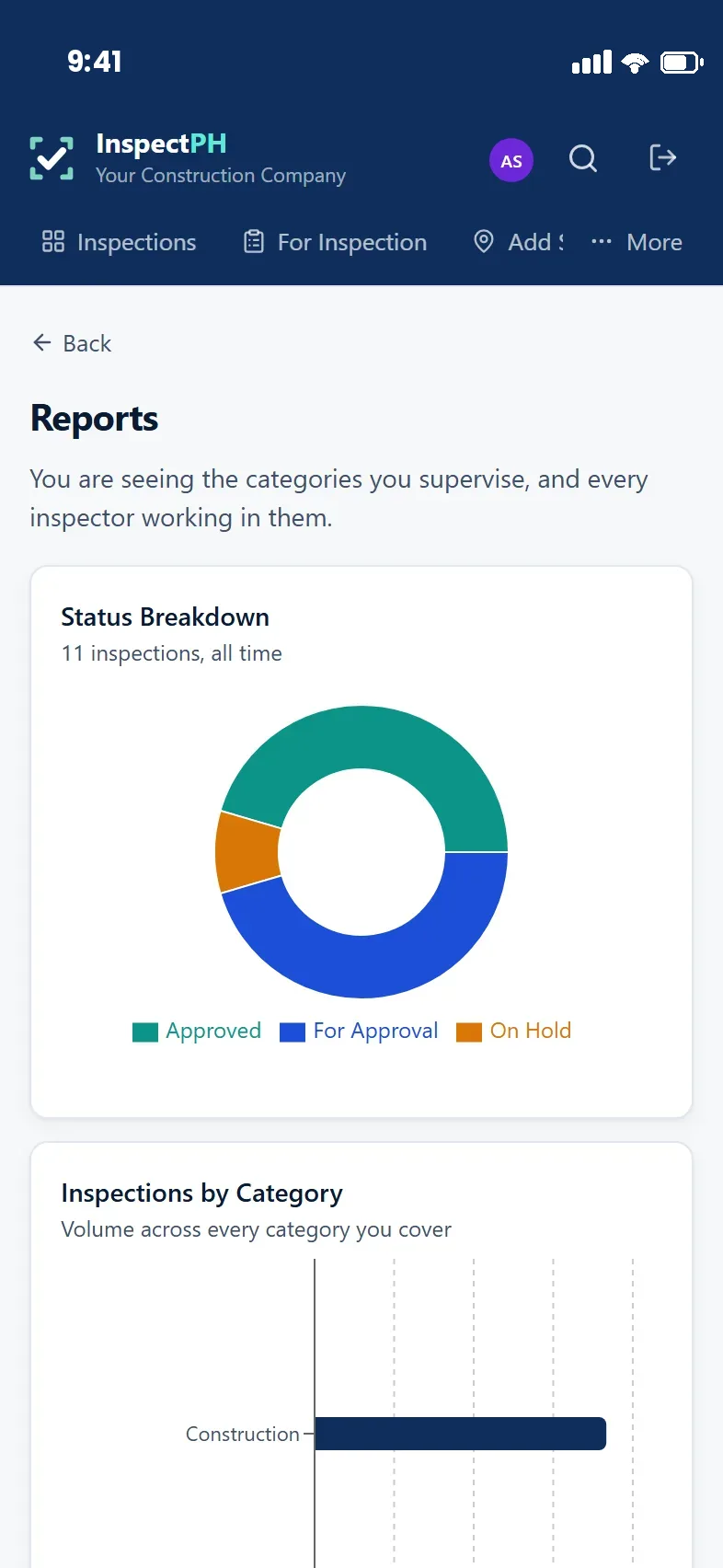
Reports screen with a status breakdown doughnut and a bar chart of inspections by category.
Where the programme standsStatus and volume across every category you supervise.
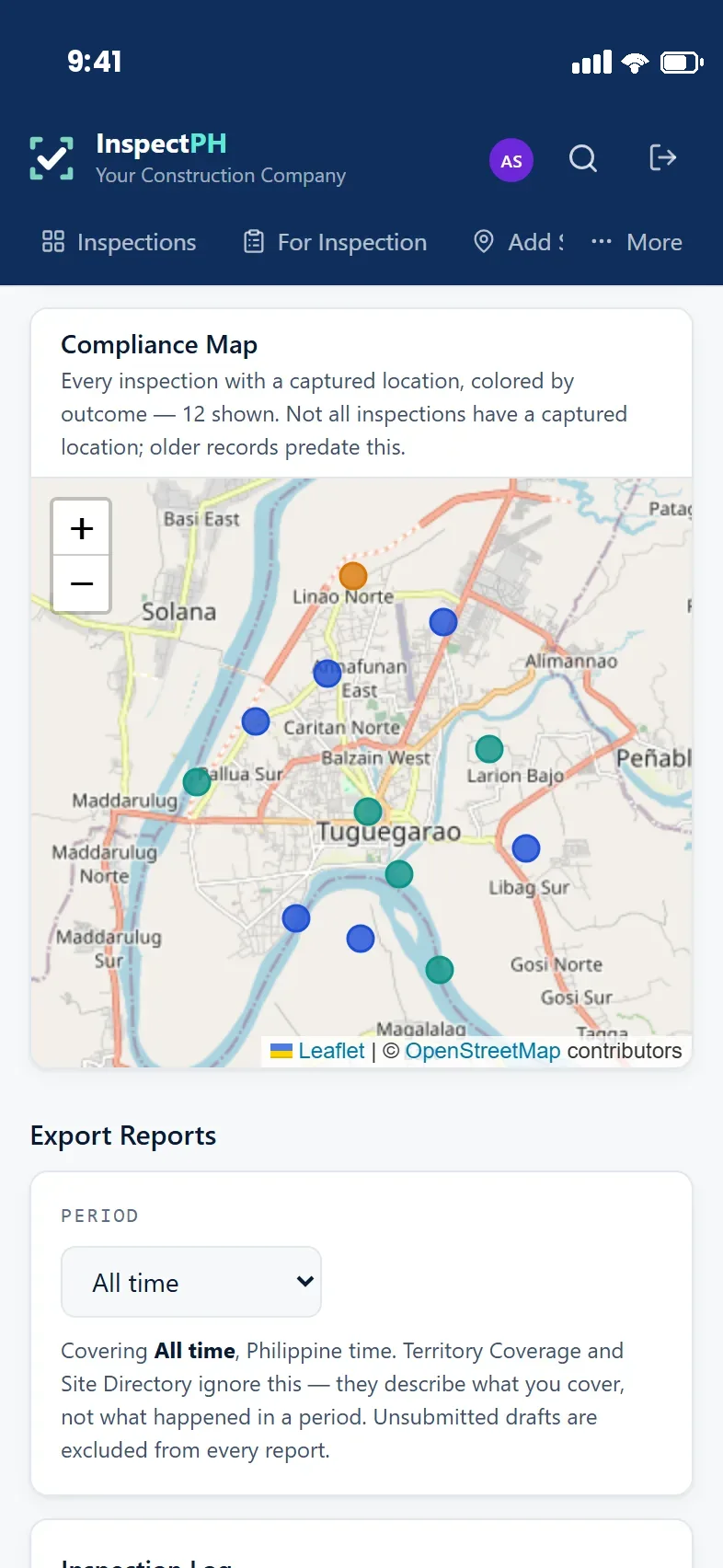
A compliance map with inspection locations coloured by outcome.
Where the failures areEvery inspection with a captured location, coloured by outcome.
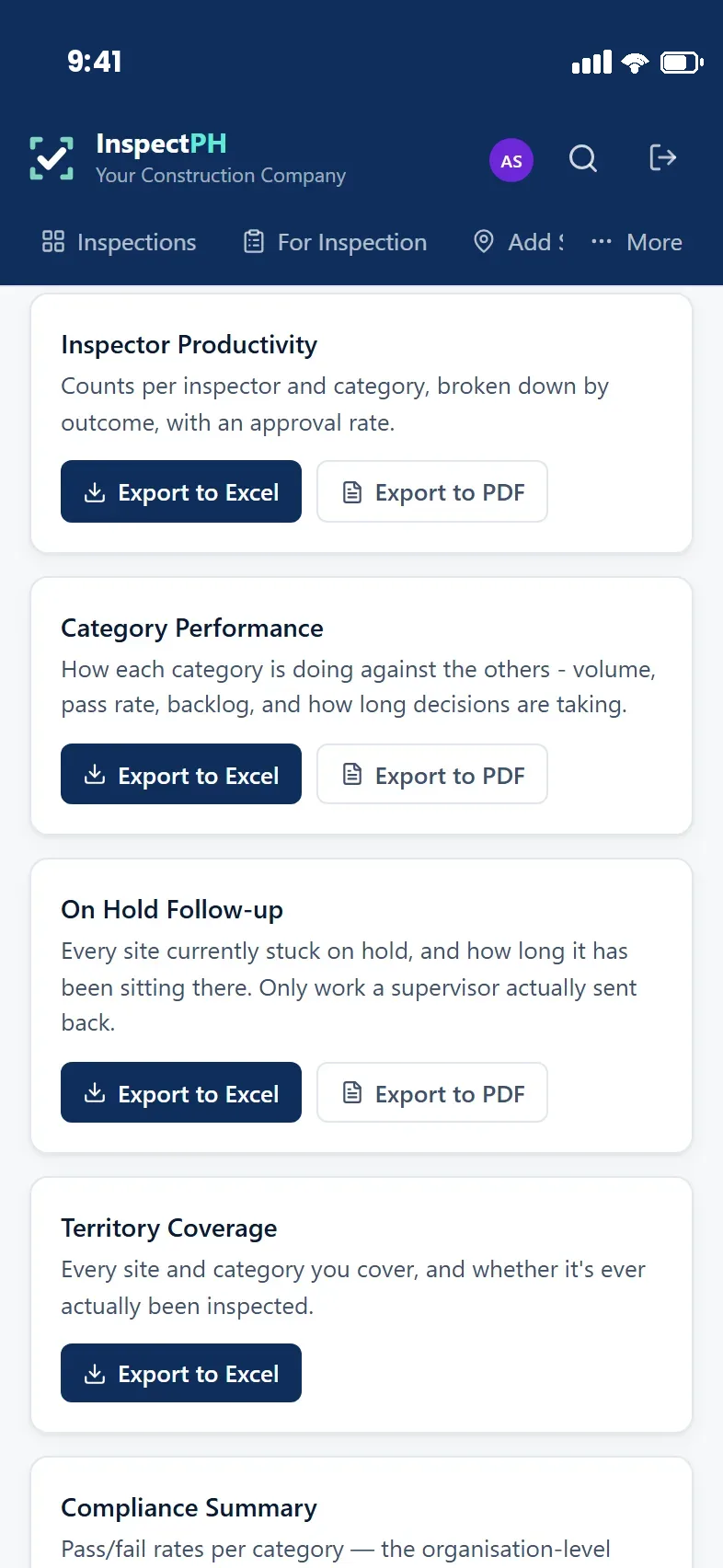
Export list: inspector productivity, category performance, on-hold follow-up and territory coverage, each with Excel and PDF buttons.
Ready to sendExcel and PDF, generated from the records themselves.
Why it fits here

Generic checklist apps are not built for inspection work in the Philippines.

Very few of them know what a barangay is, what a reference series has to look like to survive an audit, or what the Data Privacy Act asks of any organisation holding records about people. A city health office and a construction firm hit the same three walls. That gap is the product.

Every barangay, already loaded

Addresses are chosen from the official PSGC list — all 42,024 — rather than typed. One barangay does not become four spellings across four inspectors.

Reference numbers that hold up as a series

Each organisation, category and year keeps its own run. A number is issued on submission, so an abandoned draft never leaves a gap — and a gap is what an auditor asks about, whether the file is a permit or a project record.

Data Privacy Act compliance built in

A published privacy policy, a processing agreement to sign, a public route for anyone to exercise their rights under Sections 16–18, and a declaration before a form collecting sensitive personal information can be published at all. The Act binds a private company exactly as it binds an agency.

An approval trail that survives an audit

Who filed it, who decided it, when, and what changed — recorded as it happens and not editable afterwards. Staff can read the entries about themselves, which is their right under the same law.

It works where the signal does not

Assigned categories and site lists stay on the inspector's phone. An inspection started in a barangay with no coverage saves locally and sends itself once the phone is back in range.

Your data is yours, and nobody else's

Nothing here is ever published. Access is enforced in the database itself rather than by the screens: an inspector sees their own work, a supervisor their categories, an administrator their own organisation — and no organisation sees another one at all.

How it works

One cycle, five steps, repeated for as long as the office exists.

Inspection is not a project with an end date. It is a function that runs every year, against a list of establishments that keeps changing, staffed by people who move on.

01

Plan

Sites and barangays are loaded once — by spreadsheet if you already keep one — and assigned by territory and category.

02

Inspect

The inspector opens their queue, picks the site, and fills your own form on their phone.

03

Record

Findings, photographs and the capture location are saved together and submitted as one locked record.

04

Review

The supervisor approves it or returns it with a note saying what to correct. Both outcomes are recorded.

05

Report

Compliance, backlog, coverage and workload come out as Excel or as a PDF you can attach to a memo.

Who uses it

Three jobs, one system, and nobody forced to do someone else's.

A department head should not have to learn an inspector's screen to find out whether the programme is on track.

Inspector

Does the work

Sees the sites assigned to them, files inspections in the field with or without signal, attaches photographs, and can produce a PDF of their own record when asked for one.

Supervisor

Runs the programme

Assigns territories, reviews what comes in, returns work for correction with a reason, and sees the backlog by category rather than as one number.

Department head

Answers for it

Compliance rates by category, where failures concentrate, how long decisions are taking, and what is still unresolved — without asking anyone to prepare a report.

What is included

Everything below is in the product today.

Not a roadmap. If it is listed here, it is built and running.

Your own formsBuild your own inspection forms, or start from a template and change it.
Offline field modeStart and complete an inspection with no connection; it sends itself later.
Photo evidenceAttached to the finding, stripped of embedded location data unless the agency chooses otherwise.
Site list importBring an existing list of establishments in from a spreadsheet, safely re-runnable.
Territory assignmentGive inspectors barangays and categories, and see coverage against them.
Approval workflowSubmit, review, approve or return for correction — with the reason recorded.
Edit requestsA decided record can only be reopened by request, and the request is logged.
ReportsCompliance, backlog, coverage, inspector productivity and category performance.
Excel and PDF exportExcel for working with, PDF for attaching to a memo or a permit file.
MapsWhere inspections happened and where failures are concentrated.
Activity logAppend-only. Every decision, with the actor and the time.
Role-based accessAdministrator, supervisor and inspector, enforced at the database.
Pilot & pricing

We would rather prove it in one department than sell it to a whole organisation.

InspectPH begins its first pilots in October 2026. We are taking a small number of founding organisations, because the point of a pilot is that we can answer the phone when your inspector is standing at a site.

You get in touch and we call you back On the office's published number, so you know who you are dealing with. No form fills out your procurement for you.
We set you up Your categories, your forms, your site list, your people. You do not configure software; we do, and you check it.
One department runs real inspections Not a demonstration with sample data — actual establishments, actual inspectors, for an agreed period.
You decide whether it earned its place If it did, it continues as a subscription. If it did not, you have lost nothing but the pilot period.

The founding pilots are free

There is nothing to pay during your pilot. You are invoiced only if the department decides to keep it afterwards — which is the point of running one.

After that, InspectPH is billed as a monthly service subscription per department, with a seat allowance rather than a charge per inspector — adding a casual inspector for a permit rush should not cost you anything, and it certainly should not push your staff into sharing one login.

Most subscribers prefer to be invoiced annually in advance, against a document they can attach to a disbursement voucher or a purchase order. We can quote either way.

We are not able to advise on how you procure — if you are a government office that is your BAC's call, and if you are not, it is your own. We can provide a written quotation in whatever form your office or finance team needs.

Who you would be dealing with

XYPES Technologies, a Philippine software company.

InspectPH is built and supported by XYPES Technologies, a software company in the Philippines. We are not a reseller of somebody else's platform, and there is no overseas support desk — the people who wrote it are the people who answer.

If your office is considering this, the useful next step is a conversation about what your inspectors actually do today. Call or email and we will arrange a time.

Company XYPES Technologies
Office Philippines
Telephone +63 917 578 6060
Next step

Start with one department.

Tell us which office and what it inspects. If InspectPH is not a fit for how you work, we would rather say so early than sell you a subscription you stop using.